Developers
Anti bypass system
You share one public LinkUnlocker unlock URL with everyone who hits that checkpoint. The Redirect API token from User settings, Api Keys, is the secret you paste into your checkpoint dashboard. Every other step is plain HTTPS requests to LinkUnlocker.
After someone finishes your unlock page, LinkUnlocker returns a short lived signature t and sends them onward. By default they go to whatever destination your link already has. If you supply hash, they go wherever that ciphertext decrypts instead (AES-256-GCM, tied to your token). Your checkpoint service calls the encryptor to build each hash for the next URL, attaches it to the same unlock link each time. You never need a new LinkUnlocker short URL per visitor.
 Reward checkpoints (Luarmor)
Luarmor documents a short unlock URL plus an API token in the Luarmor reward system guide. Do the same with LinkUnlocker: put your link in the checkpoint field, paste the Redirect API token where they ask for a provider key, and have their backend call encrypt and validate before handing out a key. A valid hash proves the ciphertext matches your publisher token, alongside the usual unlock flow on LinkUnlocker.
1. Credentials
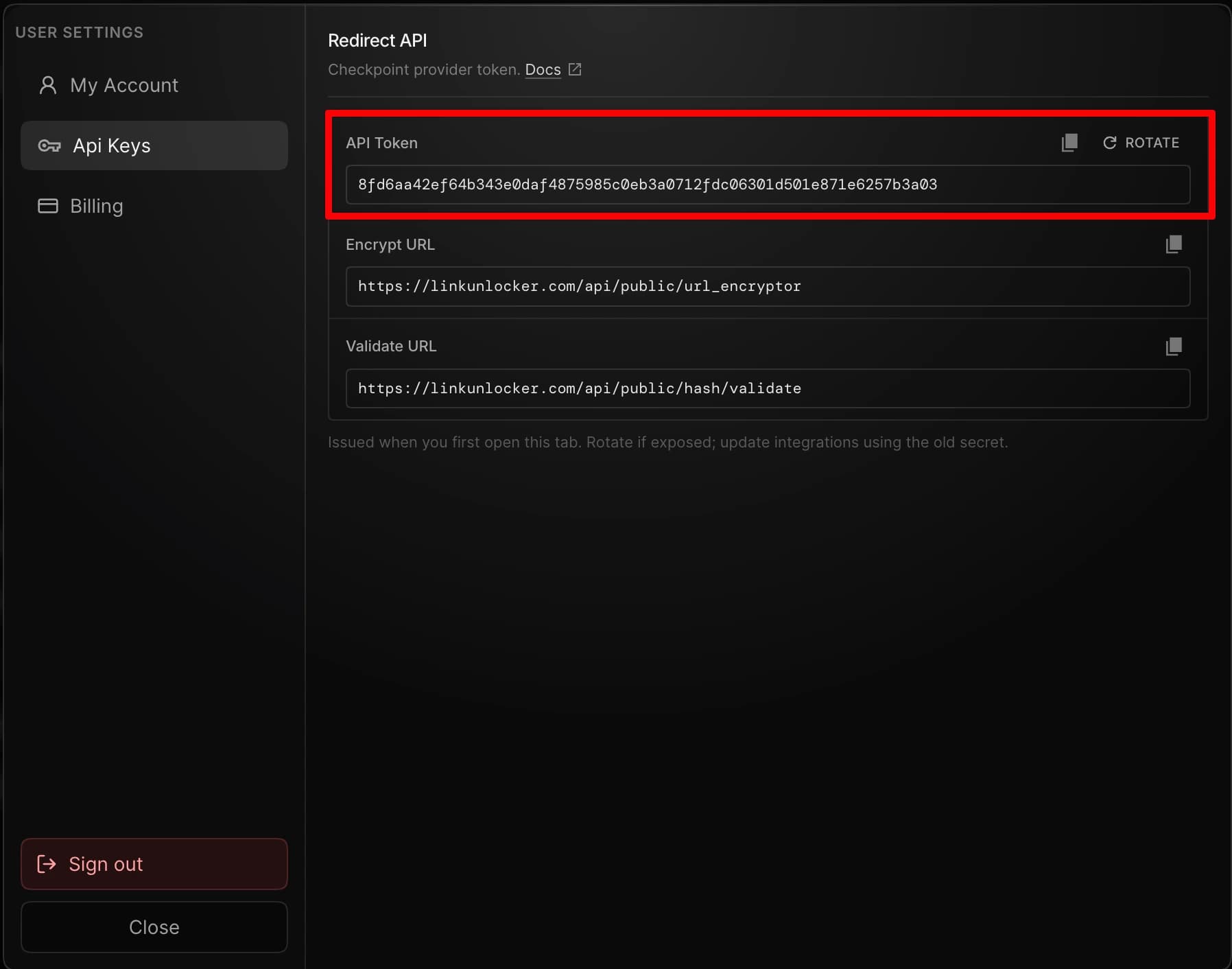
Open User settings from the dashboard (profile area, then the gear icon). Choose Api Keys in the sidebar. LinkUnlocker issues a Redirect API token (64 hex characters) the first time that tab loads. Copy the token into your checkpoint dashboard anywhere a provider API key is requested. Rotate it if it leaks, then update every integration that still used the old secret.
2. Generate a hash
Point your checkpoint or script at the encryptor with both fields below. JSON POST, form POST, and GET query parameters are all supported. You can also send Authorization: Bearer with the token and omit api_token from the body.
Send to encryptor
- destination_url
- The HTTPS redirect target for this checkpoint step.
- api_token
- Your Redirect API token (same value as under User settings → Api Keys).
// Example success body{ "type": "created", "request_time": 1730000000123, "message": "qB2HfRu5Tc4VgPnY8sLwk6JdMaZx0eUiOoAtNvCzWrE", "hash": "qB2HfRu5Tc4VgPnY8sLwk6JdMaZx0eUiOoAtNvCzWrE"}hash and message hold the exact same ciphertext (base64url, no padding). Glue it onto your unlock URL as ?hash=… or &hash=… when you send the visitor forward.
3. Verify a hash
Before your reward backend unlocks anything, call the validator and only proceed when LinkUnlocker confirms the ciphertext is valid for your publisher token.
A successful response is { "valid": true } only when decryption yields an HTTPS URL LinkUnlocker allows.
Add deleteToken=1 if you want the same ciphertext to stop validating once it has succeeded (optional replay safeguard).
async function verifyRedirectHash (hash, apiToken) { const base = 'https://linkunlocker.com/api/public/hash/validate' const q = new URLSearchParams({ hash, api_token: apiToken }) const res = await fetch(`${base}?${q}`) const data = await res.json() return data.valid === true}4. Final unlock URL
After tasks complete, the browser gets unlock token t and opens something shaped like:
https://linkunlocker.com/api/unlock/your_slug?t=<unlock_token>[&hash=<encrypted_destination>]- Skip hash when you rely on your link's normal monetized or fallback destination.
- With hash, the server must decrypt with your token.
- If the visitor landed on your slug URL with ?hash=… already attached, LinkUnlocker keeps it when it builds this redirect automatically.
- Unlock tokens expire in about 45 seconds.
5. Cryptography
AES 256 GCM. The symmetric key comes from SHA 256 applied to your Redirect API token as UTF 8 hex. On the wire the payload is URL safe Base64 that concatenates nonce, auth tag, and ciphertext in that order.